🚀 WordPress eCommerce Deployment on AWS (DevOps Project)

📌 Overview
This project is a hands-on DevOps learning project where I deployed a WordPress eCommerce website on AWS EC2 using Ubuntu Linux.
The main purpose of this project was to understand how real websites are deployed, configured, secured, and accessed on the internet.
Instead of using managed hosting, everything was done manually to gain real-world experience with Linux servers, web servers, databases, DNS, and SSL.
🧠 What This Project Covers
- Cloud infrastructure using AWS EC2
- Linux server setup and management
- Apache, PHP, and MySQL configuration
- WordPress deployment and troubleshooting
- Domain, DNS, HTTPS, and Cloudflare
- Real DevOps-style problem solving
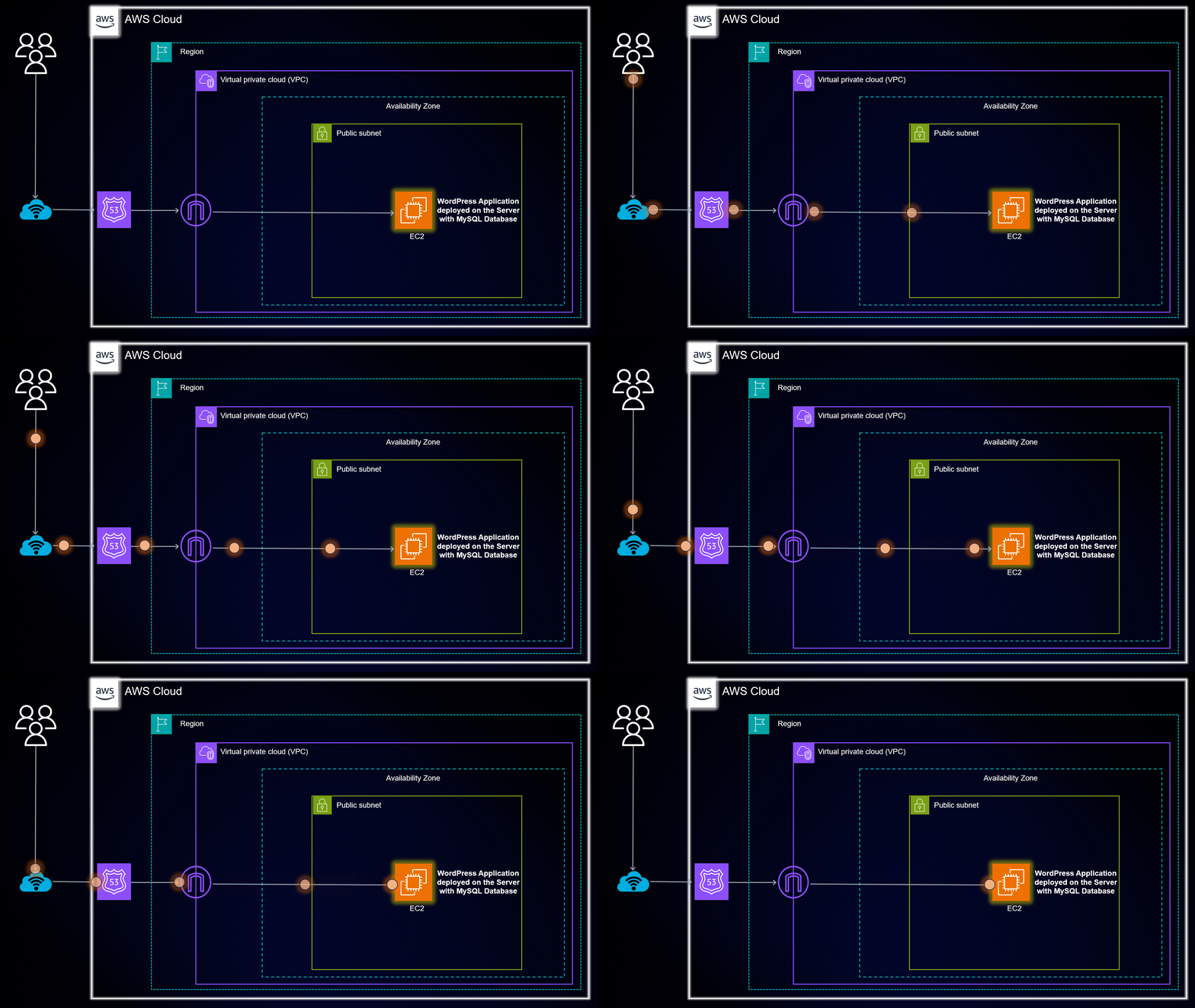
🏗️ Architecture Overview
The application runs on a single EC2 instance where all services are installed and managed manually.
User → Cloudflare DNS → AWS EC2 → Apache → WordPress → MySQL
This setup helps understand how traffic flows from a user’s browser to the backend services.
⚙️ Environment Setup
🚀 Step 1: Launching the EC2 Instance
I started by launching an EC2 instance on AWS with the following configuration:
-
Instance Type: t2.micro
-
OS: Ubuntu 22.04 LTS
-
Security Group:
-
Port 22 (SSH)
-
Port 80 (HTTP)
-
Port 443 (HTTPS)
This instance acts as the main server for the application.
🔐 Step 2: Connecting to the Server
After launching the instance, I connected to it using SSH.
ssh -i key.pem ubuntu@<EC2_PUBLIC_IP>
This gave me terminal access to manage the server directly.
🌐 Step 3: Installing Apache Web Server
Apache was installed to serve web pages:
sudo apt update
sudo apt install apache2 -y
sudo systemctl enable apache2
sudo systemctl start apache2
At this point, the Apache default page was accessible via the public IP.
🧩 Step 4: Installing PHP
WordPress requires PHP, so I installed PHP along with required extensions.
sudo apt install php libapache2-mod-php php-mysql php-curl php-gd php-mbstring php-xml php-zip php-intl -y
Apache was restarted to apply changes.
🗄️ Step 5: Setting Up MySQL Database
MySQL was installed and configured locally on the same EC2 instance.
-
Created a database
-
Created a dedicated database user
-
Assigned permissions securely
This database stores WordPress content, users, and settings.
📝 Step 6: Installing WordPress
WordPress was downloaded and placed inside the Apache document root:
cd /tmp
wget https://wordpress.org/latest.tar.gz
tar -xzf latest.tar.gz
sudo mv wordpress /var/www/html/
File ownership and permissions were fixed to avoid access issues.
🔁 Step 7: Fixing URLs and Permalinks
Initially, WordPress was installed inside a subdirectory. Later, it was moved to the root domain for cleaner URLs.
I fixed..
-
.htaccess rewrite rules
-
WordPress site URL settings
-
Apache mod_rewrite
This step helped resolve login and page access issues.
🔒 Step 8: Enabling HTTPS (SSL)
To secure the website, HTTPS was enabled using Certbot:
sudo apt install certbot python3-certbot-apache -y
sudo certbot --apache
This automatically configured SSL using Let’s Encrypt.
🌍 Step 9: Domain & Cloudflare Setup
The domain was connected using Cloudflare:
-
DNS records configured
-
Proxy enabled for security
-
HTTPS enforced
Cloudflare adds an extra security and performance layer.
🛒 Step 10: WordPress eCommerce Setup
After the server setup:
-
Installed an eCommerce theme
-
Created pages (Home, Shop, Blog, Contact)
-
Configured menus and layout
-
Tested frontend and admin dashboard
The site was now fully functional.
🧪 Troubleshooting & Learnings.
During the project, I solved issues like:
-
WordPress redirect loops
-
Apache rewrite problems
-
DNS resolution delays
-
Login and permalink errors
These problems helped me understand how DevOps troubleshooting works in real systems.
🌐 Live Project Link
📌 Final Thoughts
This project gave me strong confidence in cloud deployment and DevOps fundamentals. It showed me how small configuration mistakes can break applications — and how to fix them systematically.
This is just the beginning, and I plan to improve this setup using automation and containers in future projects.