Types of Docker Base Images Explained (with Sizes & Use Cases)..🐳
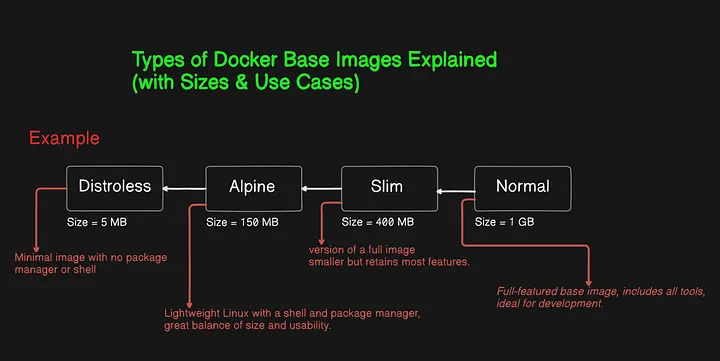
When building Docker containers, the image you choose makes a huge difference not just in size, but also in security, speed, and how easy it is to manage your app.
In this article, we’ll break down the 4 most common Docker image types:
1: Normal 2: Slim 3: Alpine 4: Distroless
You will also get real commands, size comparisons, and tips on when to use each one.
What Is a Docker Image? (Lets Recap)…..🚢
Think of a Docker image like a mini-computer. It has an operating system, tools, and your app inside. But just like real computers, some images are heavy and full-featured, while others are small and secure.
🏋️ 1. Normal Images — The Full Package Means Full OS..
- Size: 800 MB to 2 GB+
- Shell Access: Yes
- Good for: Development, debugging, and full control
Normal images come with everything — a full OS (like Ubuntu or Debian), package managers, compilers, and debugging tools.
✅ Use when:
- You’re actively building or debugging
- You need access to the terminal or tools like curl, vim, gcc, etc.
# Pull the slim image
docker pull python:3.9-slim
# see size of images
docker images
# Run container and open shell
docker run -it python:3.9-slim bash
# Inside container see files and compare with other images
cd /bin
🧪 2. Slim Images — Lighter but Still Flexible..
- Size: Around 400–900 MB
- Shell Access: Yes
- Good for: Smaller builds, test environments Slim images are lighter versions of normal ones. They remove unnecessary tools (like build dependencies), but still give you shell access and some debugging features.
✅ Use when:
You want smaller images but still need a shell You’re testing or doing light development
# Pull the slim image
docker pull python:3.9-slim
# see size of images
docker images
# Run container and open shell
docker run -it python:3.9-slim bash
# Inside container see files and compare with other images
cd /bin
ls
🏃 3. Alpine Images — Super Lightweight
- Size: ~5 MB
- Shell Access: Yes (BusyBox)
- Good for: Lightweight apps, microservices Alpine is a tiny Linux distribution designed for containers. It has a shell and package manager (apk), but not much else.
✅ Use when:
You care a lot about size and speed Your app doesn’t need a lot of OS tools
# Pull the slim image
docker pull alpine
# see size of images
docker images alpine
# Run container and open shell
docker run -it alpine sh
# Inside container see files and compare with other images
cd /bin
ls
🛡️ 4. Distroless Images — Ultra Secure & Minimal
- Size: ~2–20 MB
- Shell Access: ❌ No
- Good for: Production only (no debugging) Distroless images are the most secure and smallest. They do not include a shell, package manager, or OS tools — only your app and runtime.
✅ Use when:
You’re deploying to production You want maximum security and minimal size
# Pull the slim image
docker pull gcr.io/distroless/base
# see size of images
docker images gcr.io/distroless/base
# Run container and no shell give you error
docker run -it gcr.io/distroless/base  # error
📝 Summary
This guide explains the four main types of Docker base images — Normal, Slim, Alpine, and Distroless — and how they impact image size, security, and usability.
- Normal images are full-featured and ideal for development.
- Slim images reduce size by removing unnecessary tools.
- Alpine is ultra-lightweight with just the essentials.
- Distroless is the most secure, stripping away even the shell.
We also include example commands and file comparisons so you can test them yourself. Choosing the right image helps you build faster, safer, and smaller containers.